What Is an ATS Resume? Everything You Need to Know in 2026
Have you applied to dozens of jobs but barely received any interview calls? You're not alone.
Many job seekers assume they aren't getting interviews because they lack experience or skills. In reality, the problem often starts much earlier. Before a hiring manager even opens your application, your resume may be reviewed by software instead of a person.
That software is called an Applicant Tracking System (ATS).
Today, thousands of companies use ATS software to organize applications, search for qualified candidates, and simplify hiring. If your resume isn't compatible with these systems, it may be difficult for recruiters to find the information they need quickly.
That's why understanding what an ATS resume is has become essential for every job seeker.
The good news?
Creating an ATS-friendly resume doesn't mean making it boring or removing everything that makes you stand out. It simply means presenting your skills and experience in a format that both software and recruiters can read easily.
In this guide, you'll learn what an ATS resume is, how Applicant Tracking Systems work, and how to create one.
What Is an ATS Resume?
An ATS resume is a resume that's optimized for Applicant Tracking Systems used by many employers during recruitment. These systems scan resumes, extract important details like your work experience, education, and skills, and organize the information so recruiters can search and review candidates more efficiently.
Think of an ATS resume as a resume written for two audiences:
- Hiring software
- Human recruiters
A modern resume should impress both. Many people believe ATS resumes are plain documents filled with keywords. That's one of the biggest misconceptions.
An ATS-friendly resume should still look professional, be easy to read, and highlight your achievements. The difference is that it avoids formatting elements that software may struggle to interpret, such as text boxes, graphics, multiple columns, or decorative icons.
ATS Resume vs. Traditional Resume
| ATS-Friendly Resume | Traditional Resume |
|---|---|
| Uses standard section headings | May use creative section titles |
| Simple, clean formatting | Often includes graphics or design-heavy layouts |
| Includes relevant keywords from the job description | May use generic wording |
| Easy for ATS software to parse | Can contain elements software struggles to read |
| Optimized for both recruiters and ATS | Primarily designed for visual appeal |
The goal isn't to "beat" the ATS. The goal is to make your resume easy to understand.
When recruiters search for candidates with specific skills, certifications, or experience, a well-structured ATS resume makes it easier for your qualifications to appear in their search results.
What Is an Applicant Tracking System (ATS)?
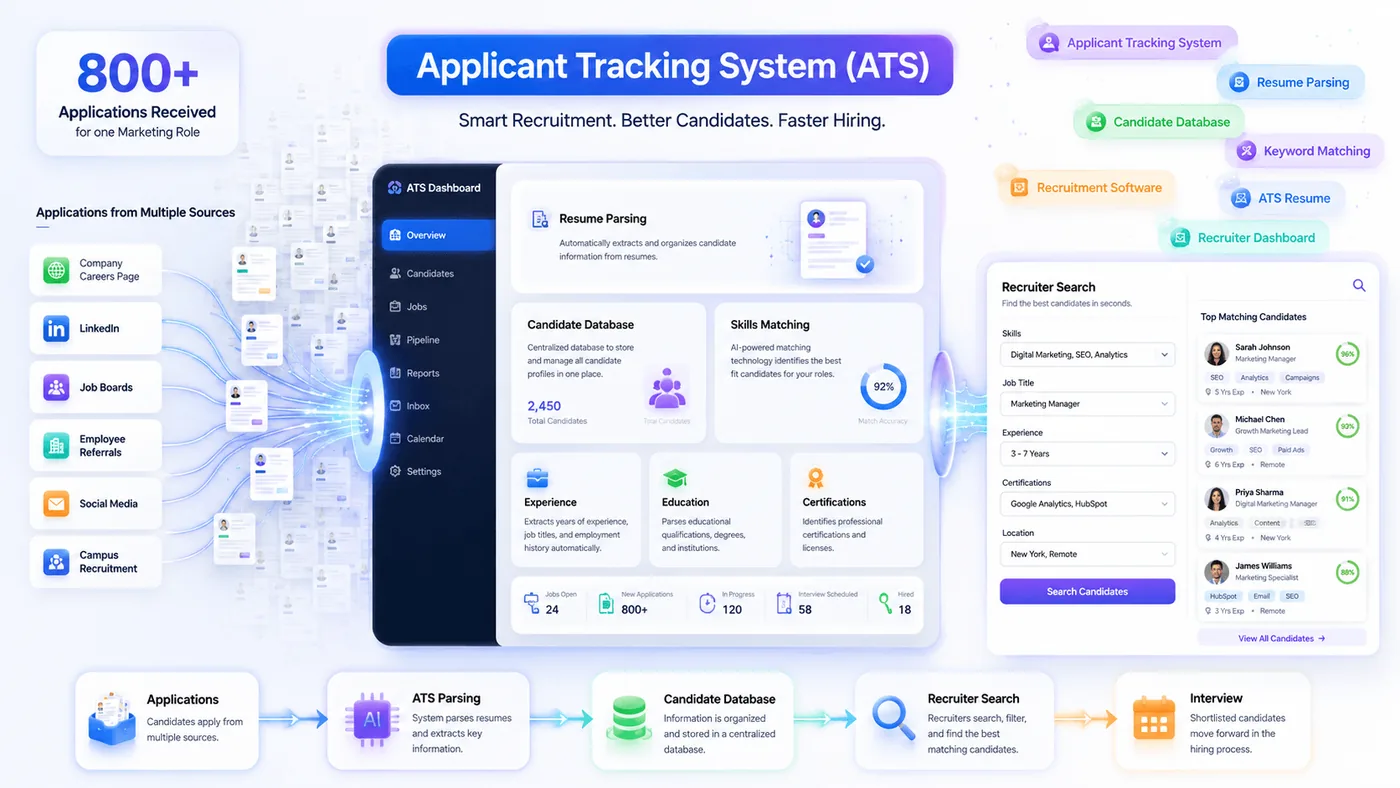
An Applicant Tracking System (ATS) is recruitment software that helps employers collect, organize, and manage job applications throughout the hiring process.
Instead of reviewing hundreds or even thousands of resumes manually, recruiters can use ATS software to keep applications in one place, search for specific qualifications, track candidate progress, and collaborate with hiring managers.
In simple terms, think of an ATS as a digital filing and search system for resumes. Imagine a company receives 800 applications for one marketing role.
Reviewing every resume manually would take days. An Applicant Tracking System helps recruiters:
- Store every application in one place
- Parse information from resumes automatically
- Search for skills, certifications, job titles, or experience
- Filter candidates based on hiring requirements
- Track applicants throughout the recruitment process
This makes hiring faster and more organized, especially for companies receiving large numbers of applications.
What Information Does an ATS Read?
When you upload your resume, the system attempts to identify and organize details such as:
- Full name
- Contact information
- Professional summary
- Work experience
- Job titles
- Skills
- Education
- Certifications
- Technical skills
- Languages
- Keywords related to the role
The extracted information is then displayed in a structured format that recruiters can quickly review.
How Does an Applicant Tracking System (ATS) Actually Work?
Many job seekers imagine an Applicant Tracking System as a robot that instantly rejects resumes.
That's not how most ATS software works. Instead, an ATS helps recruiters collect, organize, search, and review applications more efficiently. Think of it as a smart database that stores candidate information in one place.
Understanding this process can help you create a resume that's easier for both software and recruiters to read.
Let's look at what happens after you click "Apply."
Step 1: You Submit Your Resume
The hiring process begins when you upload your resume through a company's career page, a job board like LinkedIn or Indeed, or an online application portal.
Depending on the employer, you may upload your resume in PDF or DOCX format and complete additional application fields.
Once submitted, your resume enters the Applicant Tracking System.
Step 2: The ATS Parses Your Resume
The first task of the ATS is to parse your resume. Parsing simply means reading your document and organizing its content into different sections.
The software looks for information such as:
- Contact details
- Professional summary
- Work experience
- Job titles
- Employer names
- Employment dates
- Education
- Skills
- Certifications
- Languages
If your resume uses clear headings and a simple layout, the ATS can usually extract this information accurately.
However, if your resume contains graphics, text boxes, multiple columns, or unusual formatting, the software may struggle to identify important details correctly.
Step 3: The ATS Organizes Your Information
After parsing your resume, the ATS stores the extracted information in a searchable candidate profile.
Instead of reading your resume line by line every time, recruiters can search this organized data using filters such as:
- Job title
- Skills
- Certifications
- Years of experience
- Education level
- Location
- Keywords
This allows recruiters to find suitable candidates much faster.
Step 4: The ATS Matches Keywords
One of the most important functions of an ATS is keyword matching. Every job description contains important terms related to the role.
For example, a project management position may include keywords like:
- Agile
- Scrum
- Jira
- Stakeholder management
- Budget planning
- Risk management
When your resume naturally includes relevant skills and experience, recruiters can find your profile more easily when searching the ATS.
This doesn't mean you should copy every word from the job description. Instead, use relevant keywords honestly and naturally throughout your resume.
Step 5: Recruiters Search the Candidate Database
Recruiters don't always review resumes in the order they arrive. Many recruiters search the ATS database using filters to quickly identify candidates with the qualifications they need.
For example, they might search for:
- "Digital Marketing Manager"
- Google Analytics
- SEO
- HubSpot
- Five years of experience
If your resume clearly includes these qualifications, it's more likely to appear in those search results.
Step 6: Recruiters Review Your Resume
Once recruiters identify potential candidates, they read the actual resume. At this stage, your resume needs to do more than pass the ATS.
It also needs to impress a human reader. Recruiters look for:
- Relevant experience
- Career progression
- Measurable achievements
- Strong communication
- Skills that match the role
This is why an ATS-friendly resume should never focus only on keywords. It should also tell a compelling professional story.
12 Characteristics of an ATS-Friendly Resume
Now that you understand how an Applicant Tracking System works, the next question is obvious:
How to write an ATS-friendly resume? The good news is that creating an ATS resume isn't complicated.
You don't need expensive software or a flashy template. In fact, simple resumes often perform better because they're easier for both ATS software and recruiters to read.
Let's look at the key characteristics of an ATS-friendly resume.
1. Use Standard Section Headings
One of the easiest ways to make your resume ATS-friendly is by using standard section headings. Applicant Tracking Systems are designed to recognize familiar titles like Professional Summary, Work Experience, Education, Skills, and Certifications. These headings help the software identify and organize your information correctly.
Avoid replacing them with creative titles such as "My Journey" or "Career Highlights." While these may look unique, some ATS platforms may not understand them, making it harder to categorize your experience.
Recommended headings:
- Professional Summary
- Work Experience
- Education
- Skills
- Certifications
- Projects
2. Keep Your Resume Layout Simple
A clean and organized layout helps both ATS software and recruiters read your resume without distractions. The easier your resume is to scan, the better your chances of making a strong first impression.
Stick to a single-column layout, use clear headings, and leave enough white space between sections. Avoid adding graphics, text boxes, tables for layout, or multiple columns. While these design elements may look visually appealing, they can make it difficult for some ATS platforms to read your information accurately.
3. Include Relevant Keywords Naturally
Keywords play an important role in helping recruiters find your resume when they search an ATS database. These keywords usually come directly from the job description and describe the skills, qualifications, or tools required for the role.
Instead of forcing keywords into your resume, include them naturally where they reflect your actual experience. The goal is to show that your experience matches the role, not to fill your resume with repeated keywords.
4. Use a Reverse-Chronological Format
The reverse-chronological resume format is the most widely accepted format by recruiters and Applicant Tracking Systems. It lists your most recent job first and then works backward through your career history.
- This format makes it easier for recruiters to understand your career progression and quickly identify your latest experience.
- Unless you're changing careers or have a unique employment history, it's generally the best choice for most job seekers.
5. Choose Professional Fonts
Your resume should be easy to read from start to finish. Choosing a clean, professional font improves readability and gives your resume a polished appearance.
Fonts such as Calibri, Arial, Helvetica, Aptos, and Georgia are widely accepted and work well with most ATS software. Keep your font size consistent throughout the document and avoid decorative or handwritten fonts that may reduce readability.
6. Quantify Your Achievements
Recruiters want to see the impact you've made, not just a list of responsibilities. Whenever possible, support your accomplishments with numbers.
For example, instead of writing "Managed customer accounts," write "Managed a portfolio of 80+ customer accounts while improving client retention by 20%."
Adding measurable results makes your resume more convincing and gives recruiters a clearer picture of your contributions.
7. Keep Your Contact Information Clear
Your contact details should be one of the easiest parts of your resume to find. Place them at the top of the first page and include your full name, phone number, professional email address, city, and LinkedIn profile if it's up to date.
Avoid placing your contact information inside headers, footers, images, or graphics. Some ATS platforms may not extract those details correctly, which could make it harder for recruiters to contact you.
8. Use Bullet Points for Work Experience
A large paragraph of text can make your resume difficult to read. Bullet points help break down your responsibilities and achievements into short, easy-to-scan statements.
- Start each bullet point with a strong action verb.
- Focus on what you accomplished rather than simply listing your daily tasks.
- Ideally, each role should include three to six concise bullet points that highlight your most relevant achievements.
- This improves readability for both recruiters and ATS software.
9. Save Your Resume in the Correct File Format
Before submitting your application, always check if the employer has requested a specific file format. Some companies ask for a DOCX file, while others prefer PDF.
If no format is mentioned, PDF is generally a safe choice because it preserves your formatting across different devices. However, modern ATS platforms usually support both PDF and DOCX, so following the employer's instructions is always the best approach.
10. Tailor Your Resume for Every Job
Sending the same resume to every employer is one of the biggest mistakes job seekers make. Every job description highlights different skills, responsibilities, and qualifications.
Take a few minutes to customize your resume for each application by updating your professional summary, adding relevant keywords, and emphasizing the experience that best matches the role.
11. Make Your Resume Easy to Read
A well-written resume isn't just ATS-friendly—it's recruiter-friendly too. Hiring managers often spend only a short time reviewing each application, so your resume should be easy to scan.
Use consistent formatting, clear spacing, short paragraphs, and logical section order. Avoid unnecessary jargon or overly complicated language. If recruiters can quickly understand your qualifications, your resume is already working in your favor.
12. Proofread Before You Submit
Even a well-designed ATS resume can lose credibility because of simple spelling or grammar mistakes. Small errors can make recruiters question your attention to detail, especially for roles that require strong communication skills.
- Before applying, carefully proofread your resume or ask someone else to review it.
- Double-check job titles, employment dates, contact details, and links to ensure everything is accurate.
A polished, error-free resume leaves a stronger impression and shows that you care about the quality of your application.
Common ATS Resume Mistakes To Avoid
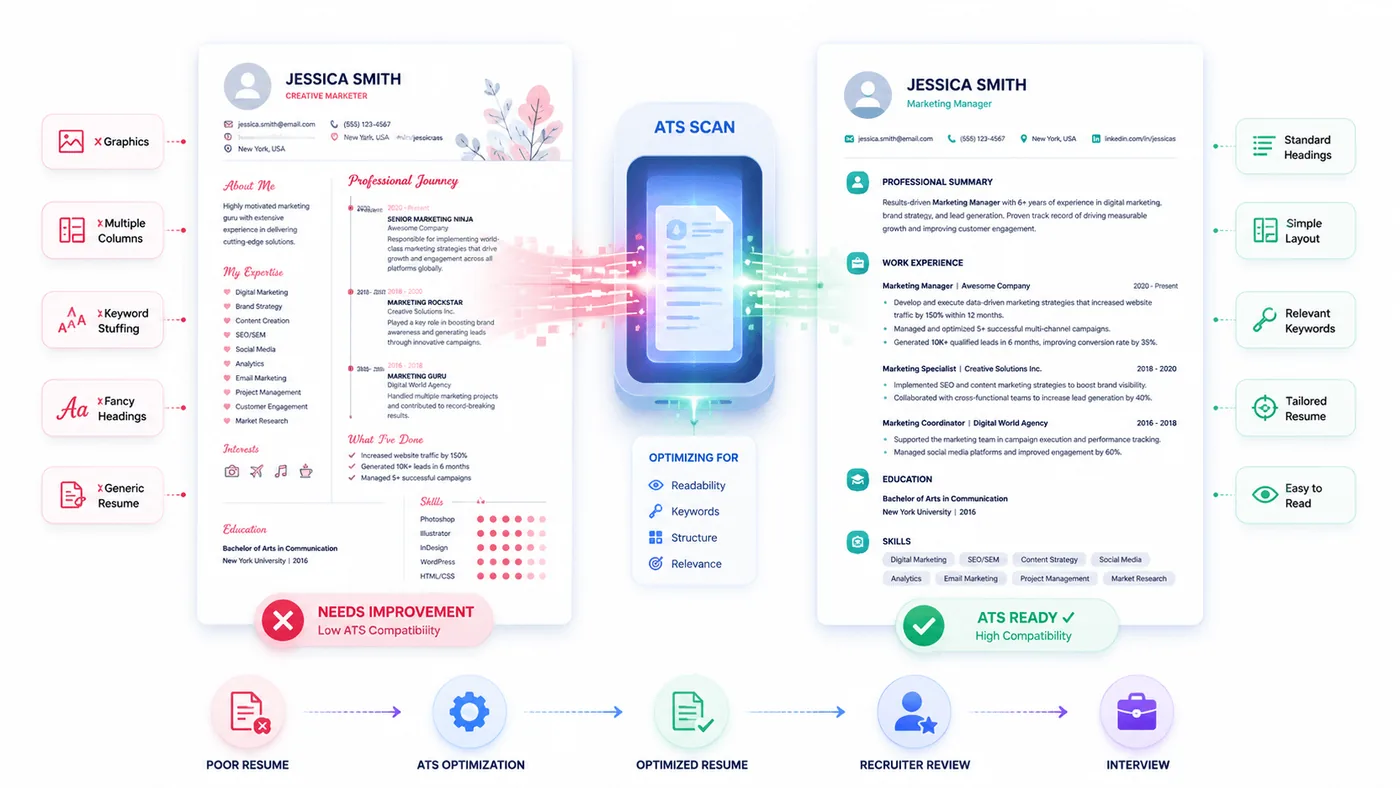
Many resumes don't perform well, not because candidates lack experience, but because avoidable mistakes make the resume harder to read or understand.
Let's look at some of the most common ATS resume mistakes and how to avoid them.
Using Graphics and Icons
Design-heavy resumes may look impressive, but graphics, icons, logos, and illustrations can make it harder for some ATS platforms to extract information accurately. Keep your resume clean and text-focused.
Adding Multiple Columns
Multi-column layouts can confuse ATS software by disrupting the reading order. A single-column format is usually the safest and easiest option.
Stuffing Your Resume with Keywords
Adding the same keyword repeatedly won't improve your chances. Instead, it can make your resume sound unnatural and may raise concerns for recruiters. Use relevant keywords where they genuinely fit your experience.
Ignoring the Job Description
Sending the same resume to every employer is one of the biggest mistakes job seekers make. Every role emphasizes different skills and qualifications. Take a few minutes to tailor your resume for each application.
Choosing Creative Section Titles
Recruiters may appreciate creativity, but ATS software works best with familiar headings.
Use titles such as:
- Professional Summary
- Work Experience
- Education
- Skills
These are widely recognized and help organize your resume correctly.
Can AI Write an ATS Resume?
AI has changed the way people write resumes. Today, many job seekers use AI tools to create summaries, rewrite work experience, or improve their resumes before applying for jobs.
But can AI create an ATS-friendly resume? The answer is yes, to an extent.
AI can help you:
- Improve grammar and sentence structure.
- Rewrite bullet points more professionally.
- Suggest relevant keywords.
- Tailor your resume for a specific job description.
- Create a stronger professional summary.
However, AI isn't perfect.
It doesn't know your career as well as you do. It may exaggerate achievements, miss important details, or generate generic content that sounds similar to thousands of other resumes.
Recruiters can often recognize resumes that rely too heavily on AI because they lack personality and specific accomplishments.
Should You Hire a Professional ATS Resume Writer?
If you've been applying for jobs consistently but aren't receiving interviews, it may be time to look beyond your qualifications and evaluate your resume.
A professional ATS resume writer doesn't just improve formatting. They understand how recruiters review resumes, how Applicant Tracking Systems organize information, and how to present your experience in the strongest possible way.
Hiring a professional can be especially valuable if you:
- Aren't getting interview calls despite meeting the job requirements.
- Are changing careers or industries.
- Have several years of experience and want to highlight your achievements.
- Have employment gaps or a complex career history.
- Want to apply for senior or leadership roles.
- Need a resume that's optimized for both ATS software and recruiters.
Professional resume writers also know how to identify your strongest accomplishments, write compelling achievement-focused bullet points, and tailor your resume to today's hiring standards.
While no resume writer can guarantee a job offer, a professionally written ATS-friendly resume can help you present your experience more effectively and improve your chances of reaching the interview stage.
Final Thoughts
Understanding what an ATS resume is can make a real difference in your job search.
While Applicant Tracking Systems have changed the way companies manage applications, they haven't changed what employers are looking for. Recruiters still want candidates with the right skills, relevant experience, and measurable achievements.
The difference is that your resume now needs to communicate those strengths in a way that's easy for both technology and people to understand.
If you're not getting interview calls despite having the right experience, your resume may need more than a few formatting changes. It may need a strategic rewrite that better reflects your value and aligns with modern hiring practices.
Need an ATS-Friendly Resume That Gets Results?
At Enhance Resume, we create professionally written, ATS-friendly resumes that are tailored to your experience, industry, and career goals. Whether you're a recent graduate, an experienced professional, or preparing for your next career move, we're here to help you present your best self with confidence.
FAQs
What is an ATS resume?
An ATS resume is a resume designed to be easily read by an Applicant Tracking System. It uses simple formatting, standard section headings, and relevant keywords so both the software and recruiters can review your qualifications efficiently.
Is an ATS-friendly resume different from a normal resume?
The content is often similar, but an ATS-friendly resume avoids formatting that may interfere with resume parsing. It focuses on clear headings, readable layouts, and keywords that accurately reflect your experience.
Can ATS read PDF resumes?
Most modern Applicant Tracking Systems can read both PDF and DOCX files. However, if an employer specifies a preferred file format, it's always best to follow those instructions.
What resume format works best with ATS?
The reverse-chronological resume format is generally considered the most ATS-friendly. It clearly presents your most recent experience first and is widely accepted by recruiters.
Do all companies use Applicant Tracking Systems?
No. Smaller businesses may review resumes manually, while many medium and large organizations use ATS software to help manage high volumes of applications.
Can ATS reject my resume automatically?
An ATS doesn't always reject resumes. In most hiring processes, it stores, organizes, and helps recruiters search applications. Hiring decisions are still made by people.
Should I use keywords in my resume?
Yes. Include keywords that genuinely match your skills and experience. The best place to find them is in the job description. Avoid adding keywords that don't accurately represent your background.
Are resume templates ATS-friendly?
Some templates are, while others aren't. Templates with simple layouts, standard headings, and minimal design elements are generally the safest choice.
← Back to all articles